
keebx: Keypad
Part of the keebx engineering log.
👉🏻 Don’t be confused, this project is about making a full-fledged keyboard, not a keypad. The keypad detailed in this page is made for prototyping purposes only.
Matrix
I’ll use a simple 4*4 push buttons keypad for developing purposes; the buttons matrix principle is the same that will be found in the fill-size keyboard.
There are 16 push buttons and 16 diodes. The diodes are needed to prevent the key ghosting problem, and masking problem.
Here is a quick PCB I made on KiCad and ordered on JLCPCB (they are not a sponsor of this project and I’m not affiliated with them at all).
The final PCB looks like this:
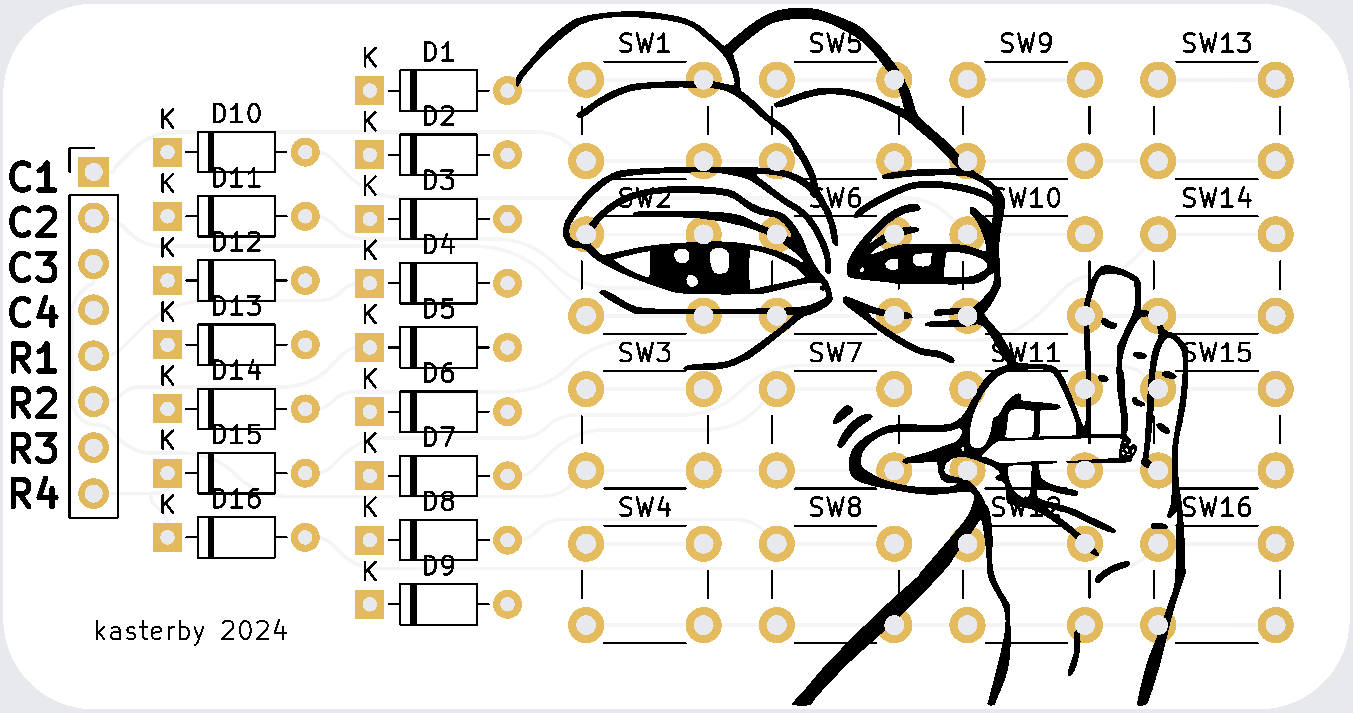
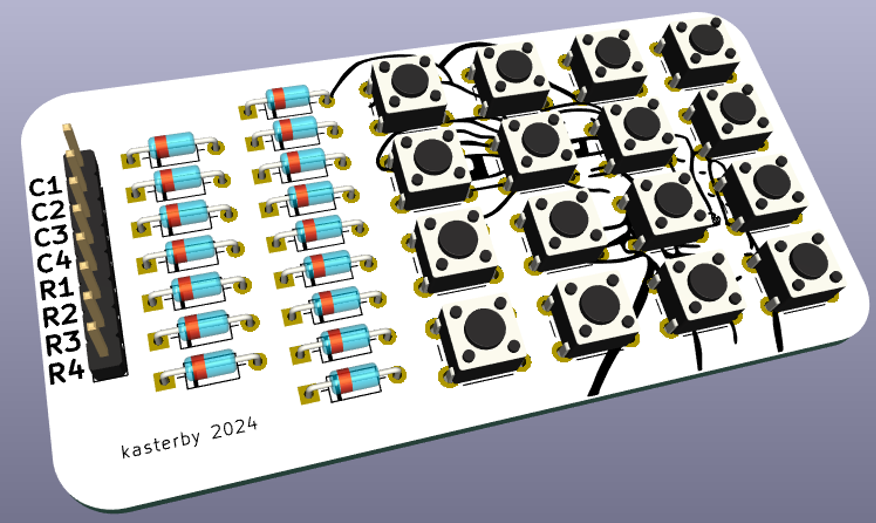
The source files of this board are available on Github. It’s a very basic, classic buttons matrix, and it was absolutely not needed to design one since there are already hundreds of available designs online. But once again, I’m doing all of this to have fun and make something truly custom, so I’ll try to make everything myself. The total price for 5 boards, taxes & shipping to France was 4.10$ (I’m amazed by how cheap this is).
⚠️ My PCB has routing problems. I used a KiCad plugin that automates routing, and I checked an option that makes “curved” tracks. I did not check the result before manufacturing, and some tracks unfortunately connect to 3 pads, so I had to manually fix these mistakes. You’ll need to re-route this PCB in a proper way, or at least move the offending tracks a few millimeters away from the solder pads they touch.
This is the TinyGo firmware that I made to test my keypad. It implements basic and inefficient matrix scanning. I’ll explain how it works below.
package main

import (
	"machine"
	"machine/usb/hid/keyboard"
	"time"
)

const MOD_NONE = 0x00

var (
	R1 machine.Pin = machine.GP15
	R2 machine.Pin = machine.GP14
	R3 machine.Pin = machine.GP13
	R4 machine.Pin = machine.GP12
	C1 machine.Pin = machine.GP11
	C2 machine.Pin = machine.GP10
	C3 machine.Pin = machine.GP9
	C4 machine.Pin = machine.GP8
)

type Key struct {
	code     keyboard.Keycode
	modifier keyboard.Keycode
	char     string
}

var keymap = [4][4]Key{
	{
		{code: keyboard.KeyQ, modifier: MOD_NONE, char: "a"},
		{code: keyboard.KeyB, modifier: MOD_NONE, char: "b"},
		{code: keyboard.KeyC, modifier: MOD_NONE, char: "c"},
		{code: keyboard.KeyD, modifier: MOD_NONE, char: "d"},
	},
	{
		{code: keyboard.KeyE, modifier: MOD_NONE, char: "e"},
		{code: keyboard.KeyF, modifier: MOD_NONE, char: "f"},
		{code: keyboard.KeyG, modifier: MOD_NONE, char: "g"},
		{code: keyboard.KeyH, modifier: MOD_NONE, char: "h"},
	},
	{
		{code: keyboard.KeyI, modifier: MOD_NONE, char: "i"},
		{code: keyboard.KeyJ, modifier: MOD_NONE, char: "j"},
		{code: keyboard.KeyK, modifier: MOD_NONE, char: "k"},
		{code: keyboard.KeyL, modifier: MOD_NONE, char: "l"},
	},
	{
		{code: keyboard.KeySemicolon, modifier: MOD_NONE, char: "m"},
		{code: keyboard.KeyN, modifier: MOD_NONE, char: "n"},
		{code: keyboard.KeyO, modifier: MOD_NONE, char: "o"},
		{code: keyboard.KeyP, modifier: MOD_NONE, char: "p"},
	},
}

func main() {
	kb := keyboard.New()
	time.Sleep(time.Second)

	rows := [...]machine.Pin{R1, R2, R3, R4}
	columns := [...]machine.Pin{C1, C2, C3, C4}

	inputConfig := machine.PinConfig{Mode: machine.PinInputPulldown}
	for i := range columns {
		columns[i].Configure(inputConfig)
	}

	outputConfig := machine.PinConfig{Mode: machine.PinOutput}
	for i := range rows {
		rows[i].Configure(outputConfig)
		rows[i].Low()
	}

	prevState := [4][4]bool{}
	for {
		currentState := [4][4]bool{}
		changed := false

		for rowIdx := range rows {
			for k := range rows {
				if k == rowIdx {
					rows[k].High()
				} else {
					rows[k].Low()
				}
			}
			time.Sleep(time.Millisecond)

			for colIdx := range columns {
				currentState[rowIdx][colIdx] = columns[colIdx].Get()
				if currentState[rowIdx][colIdx] != prevState[rowIdx][colIdx] {
					changed = true
					key := keymap[rowIdx][colIdx]
					if currentState[rowIdx][colIdx] {
						if key.modifier != MOD_NONE {
							kb.Down(keyboard.Keycode(key.modifier))
						}
						kb.Down(keyboard.Keycode(key.code))
					} else {
						kb.Up(keyboard.Keycode(key.code))
						if key.modifier != MOD_NONE {
							kb.Up(keyboard.Keycode(key.modifier))
						}
					}
				}
			}
		}

		if changed {
			prevState = currentState
		}

		time.Sleep(10 * time.Millisecond)
	}
}
So this program does a few things:
-
First, it sets up the pins. We have 4 rows (GP15-GP12) and 4 columns (GP11-GP8). The rows are outputs and columns are inputs with pulldown resistors.
-
It defines what each key does using a keymap. Each key has:
-
A keycode (what key it represents, like KeyQ for 'q')
-
A modifier (like shift or ctrl, but we're not using any here)
-
A character (just for reference)
- The main loop is pretty simple:
-
Set one row HIGH
-
Check all columns
-
If a column is HIGH, that key is pressed
-
Move to next row
-
Repeat forever
- When it finds a pressed key:
-
If it wasn't pressed before, send a "key down" event
-
If it was pressed before but now isn't, send a "key up" event
That's it! It's not very elaborate, but it works. The main issues with this code are:
-
No debouncing (keys can "bounce" and register multiple times)
-
Inefficient scanning (wastes CPU cycles)
-
Basic error handling
But it's a good starting point to understand how keyboard scanning works in practice.